While nearly every hosting provider includes free Let’s Encrypt SSL these days, not all of them make it easy to manage. What sets Hostinger and GreenGeeks apart is how seamlessly they handle SSL setup and renewals. With Hostinger, for example, you can install and manage your SSL certificates directly through their user-friendly dashboard (hPanel) — or let their support team handle it for you. It’s hassle-free security that just works, which is a big plus for beginners and busy site owners alike.
1. Hostinger

Website: https://www.hostinger.com/
Who Is Hostinger’s Free SSL Hosting For?
Hostinger is a budget-friendly hosting provider that’s grown into a global favorite, especially among beginners and small business owners. Known for its polished user interface, great performance, and low prices, Hostinger makes it easy for anyone to get a secure, professional site up and running in minutes.
While free Let’s Encrypt SSL is now standard across most hosts, Hostinger sets itself apart with how easy it makes the entire process. Whether you’re running a simple blog or managing multiple business sites, SSL setup and renewal here is hassle-free — even for non-tech users.
Why Do We Like Hostinger’s Free Let’s Encrypt SSL?
Every domain you host on Hostinger automatically comes with a free Let’s Encrypt SSL — no manual installation required. The company takes extra care to streamline certificate management via its custom-built hPanel.
For those who prefer a hands-off experience, Hostinger’s support team is also on standby to help with SSL-related requests — a bonus for less technical users. Best of all, SSL certificates here never expires – this removes the hassles of renewing your SSL and ensures your site stays secure without interruptions.
Discover more about this provider in our Hostinger Review.
How To Install Let’s Encrypt SSL on Hostinger

SSL installation on Hostinger is quick and beginner-friendly. Every domain hosted on their platform is secured with a domain-validated SSL certificate that complies with PCI DSS standards, making it suitable for protecting all types of websites — including those handling payments or personal data.
- Log in to your hPanel > Go to Websites > Select your site > Security > Click on SSL
- Click “Set up” to install the free Let’s Encrypt SSL with a single click
Once installed, the SSL certificate activates HTTPS and the padlock icon in browser address bars — both key trust indicators for your visitors. All certificates are automatically renewed free of charge, so there’s no manual work or risk of expiration.
Hostinger Pros
- Affordable - Plans start at $1.99/month and support up to 25 websites.
- Global network of data centers in Europe, Asia, North America, and South America
- AI-powered tools including Website Builder (HWB), Horizons app builder, and Kodee assistant
- Custom-built, user-friendly control panel (hPanel)
- Hostinger API with MCP integration for programmatic control
- Multiple payment methods accepted, including crypto and digital wallets
- Extra 15% off with our exclusive coupon code “HOSTSCORE15”
Hostinger Cons
- Significant price increases upon renewal
- No Windows hosting support
- Lower-tier shared plans come with resource limits that may not suit high-traffic sites
- Websites built with Hostinger Website Builder cannot be migrated to VPS or other hosts
2. GreenGeeks

Website: https://www.greengeeks.com/
Who Is GreenGeeks’ Free SSL Hosting For?
GreenGeeks is an eco-friendly provider with fast, reasonably-priced shared hosting, reseller hosting, and VPS hosting packages. It has positioned itself as a global loader in carbon-free high-level hosting.
But, although GreenGeeks was launched in 2008, it was only until 2018 that Let’s Encrypt was added as one of its SSL certificate options. Previously, the web hosting provider only offered Premium Alpha Wildcard SSL Certificate.
Why Do We Like GreenGeeks’ Free Let’s Encrypt SSL?
You can expect to find two options here. You either pick the Let’s Encrypt Wildcard SSL Certificate, or the Premium Alpha Premium AlphaSSL Wildcard SSL Certificate.
That said, the former is predominantly chosen over the latter because it’s completely free of charge. Let’s Encrypt gives you decent data protection at no cost at all.
The AphaSSL option, on the other hand, is only available to users who can afford to pay $99.95 a year. It pushes your data security beyond the confines of the alternative Let’s Encrypt SSL option, owing to its 256-bit encryption, 2048 bit root strength, digital seal, and warranty.
Uncover additional interesting details about the web hosting solution from our GreenGeeks Review.
How To Install Let’s Encrypt SSL on GreenGeeks
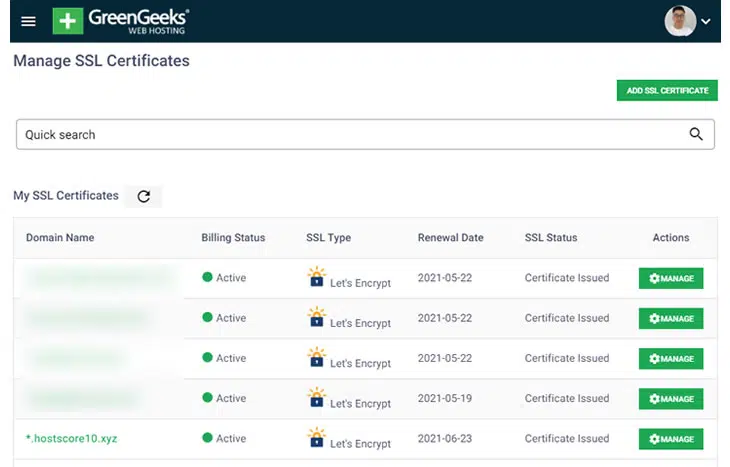
There are two ways to install Let’s Encrypt SSL on your GreenGeeks-hosted websites.
- Simply get in touch with GreenGeek’s support, make a request, and they’ll do the job for you.
- Go to “Security” > “Add SSL Certificate” in your GreenGeeks user and install your free SSL certificate using their management tools. The process is simple and requires only a few clicks.
Then once your Let’s Encrypt SSL certificates are installed, the system will renew them automatically every 90 days.
GreenGeeks Pros
- 300% green energy offset with RECs
- Affordable entry pricing for shared and WordPress hosting plans
- Free daily backup for all shared hosting plans
- Partnership with One Tree Planted plants a tree for every new hosting account
- Free website migration assistance
- Enhanced scalability options with VPS and dedicated plans
GreenGeeks Cons
- Higher renewal rates across shared and WordPress plans
- Slightly lackluster customer service, with complaints of limited support for customers transferring domains out of the platform
3. HostArmada

Website: https://www.hostarmada.com/
Who Is HostArmada’s Free SSL Hosting For?
HostArmada is a rising star in the hosting space, known for its affordable pricing, cloud-based infrastructure, and top-tier customer support. It’s especially appealing to users who want high performance, strong security, and responsive help — without paying enterprise-level pricing.
Since day one, HostArmada has supported free SSL certificates on all plans, and they’ve done a great job making the process both flexible and beginner-friendly.
Why Do We Like HostArmada’s Free Let’s Encrypt SSL?
HostArmada offers unlimited free Let’s Encrypt SSL certificates, even on its entry-level plans. That means every domain and subdomain you host is covered — and unlike some providers, HostArmada doesn’t lock SSL behind paywalls or techy setup procedures.
The best part? Certificates renew automatically and the entire SSL management system is deeply integrated into their cPanel environment. If you prefer a human touch, their 24/7 support team will happily install or troubleshoot your SSL for you.
Read more about this host’s performance and features in our HostArmada Review.
How To Install Let’s Encrypt SSL on HostArmada
There are two simple ways to enable SSL at HostArmada:
- Log in to cPanel > Navigate to “SSL/TLS Status” > Choose your domain(s) and click “Run AutoSSL”
- Or, open a live chat with support and they’ll handle it for you
Once installed, Let’s Encrypt SSL certificates renew automatically — keeping your site secure without any manual work.
HostArmada Pros
- Competitive pricing
- Daily remote backups with up to 21 days of restore points
- NGINX server and NVMe storage for all shared hosting plans
- 45-day money-back guarantee
- Free malware scans and Web Application Firewall (WAF) on all shared hosting plans
- Supports hosting of legal adult content websites
- Wide range of server locations
HostArmada Cons
- Price increases upon renewal
- Entry-level plan supports only one website
- Advanced speed features like dynamic caching are limited to the highest-tier shared plan
4. SiteGround

Website: https://www.siteground.com/
Who Is SiteGround Hosting For?
SiteGround is one of the most established web hosts today, thanks to its full stack of user-friendly, performance-optimized hosting packages.
Combined, they serve possibly all types of users- stretching from bloggers, freelancers, and professionals, to small businesses, startups, enterprises, agencies, app developers, etc.
Why Do We Like SiteGround’s Free SSL Solution?
For adequate site protection, SiteGround throws in two types of Let’s Encrypt SSL certificates- Single Domain SSL and Wildcard SSL.
Both of them can be accessed by all users on the platform for free, with the Single Domain SSL being the default automatic option. You’ll find it pre-installed on all the primary and secondary domains running on SiteGround’s shared hosting packages.
But, if you’d prefer Wildcard SSL instead, you have to add it via SiteGround’s “Let’s Encrypt” tool.
This is the same tool that cloud hosting and dedicated hosting accounts use to configure Let’s Encrypt SSL options.
For further insights into the whole SiteGround platform, feel free to check out our full SiteGround Review.
How to Install Let’s Encrypt SSL on SiteGround?

Since shared hosting users get Let’s Encrypt Single Domain SSL certificates by default, manual installation only applies when they choose to switch to Wildcard SSL.
But, it turns out this privilege doesn’t extend to cloud hosting and dedicated server users. They have to manually integrate all their SSL certificates.
Fortunately, however, the procedure is extremely simple. Just go to SiteGround’s “Let’s Encrypt” tool, specify the domain name, and then select the SSL certificate you’d prefer. Once you’re done, simply click “Install” and SiteGround will handle the rest.
SiteGround Pros
- Outstanding hosting uptime and speed performance
- Excellent customer support
- Powered by Google Cloud Platform
- 1-click CDN included in all shared plans
- Specialized WordPress support staff
- Automatic geo-distributed daily backups
- White-label user dashboard and private DNS in GoGeek plans
SiteGround Cons
- Expensive renewal pricing
- Limited storage in shared hosting plans
- Still using traditional SSD instead of NVMe storage
- Staging tool not included in entry-level shared plan
5. DreamHost

Website: https://www.dreamhost.com/
Who Is DreamHost For?
DreamHost is another reliable full-stack web hosting solution that specializes in all the basic types of services- WordPress hosting, shared web hosting, cloud hosting, dedicated servers, managed hosting, etc.
Why Do We Like DreamHost’s Free Let’s Encrypt SSL?
Among the things this provider boasts of is a partnership with Let’s Encrypt, which sees it distribute free SSL and TLS certificates. However, Dreamhost doesn’t embed your Let’s Encrypt SSL automatically. You have to add the certificates manually through your account.
Thankfully, the installation process here is fairly straightforward. Even beginners can easily configure their Let’s Encrypt SSL certificates.
The only problem is, this procedure doesn’t enable Let’s Encrypt SSL on multiple domains concurrently. If you have more than one domain attached to your account, DreamHost requires you to add their certificates separately.
Discover more about other features you’ll find on the platform from our comprehensive DreamHost review.
How To Install Let’s Encrypt SSL on DreamHost?
The process of installing Let’s Encrypt SSL begins from DreamHost’s “SSL/TLS Certificates” section of your account. This page should display all the domains linked to your account.
To proceed, choose one of the domains and then click on the “Add” button right next to it. DreamHost will generate a list of its default SSL certificate options, from where you should choose Let’s Encrypt SSL.
DreamHost Pros
- Reliable server uptime performance
- Daily backup included in all shared hosting plans
- 97-day Money back guarantee
- Extensive knowledgebase
DreamHost Cons
- Price increase during the renewal
- Live chat support can be better
- No free site migration assistance
What Is Let’s Encrypt SSL?

Let’s Encrypt is a free, automated certificate authority (CA) that provides domain-validated (DV) SSL certificates to help website owners enable HTTPS. Founded by the Internet Security Research Group (ISRG), Let’s Encrypt launched in 2015 with a mission to make encrypted connections the default standard for all websites. Today, it powers millions of secure websites across the internet.
Unlike traditional paid SSL providers, Let’s Encrypt certificates are issued instantly, without human intervention, using an open protocol called ACME (Automated Certificate Management Environment). This eliminates the need for paperwork, verification calls, or waiting times. The result is a seamless and user-friendly way for website owners — from bloggers to small business operators — to protect their visitors and improve trust.
The main goal of Let’s Encrypt is accessibility. By removing cost and complexity, it helps promote widespread HTTPS adoption. Free SSL is not only good for security but also improves your website’s SEO, as Google favors secure sites. In most cases, it’s installed and renewed automatically through your hosting provider, making it a true set-it-and-forget-it solution.
Many leading web hosts now integrate Let’s Encrypt directly into their control panels. That means you can activate SSL with a single click, with no need for technical skills. For most personal sites, portfolios, blogs, and small business websites, Let’s Encrypt provides more than enough security to protect user data and meet basic compliance standards. It’s trusted by all major browsers and offers the same level of encryption as paid domain-level certificates.
In short, Let’s Encrypt is not just “good enough” — it’s actually the smart choice for most website owners. Its open, free, and trusted infrastructure is a major step forward for making the web a safer place for everyone.
How Let’s Encrypt SSL Renewal Works
Tired of Managing Your Free SSLs? Generate & Renew Unlimited SSLs from One Place
Managing multiple SSLs on different platforms can be frustrating. ZeroSSL.com lets you generate and manage unlimited SSL certificates for just $10 per month.
Let’s Encrypt SSL certificates have a shorter lifespan than traditional ones: they are valid for 90 days. But don’t worry — this is actually by design. Short lifespans improve security by reducing the risk of long-term misuse if a certificate is ever compromised. More importantly, Let’s Encrypt was built with automation in mind, so renewal happens behind the scenes.
Many modern web hosting providers handle this automatically. When your certificate is about to expire, the system checks and renews it without any action needed on your part. If you’re with a host that has proper Let’s Encrypt integration, it’s truly a set-it-and-forget-it feature.
Without automation, you’d need to renew it manually using command-line tools — something that can be technical and time-consuming. This is why choosing a host with built-in SSL automation is so important. It prevents the risk of certificate expiration, which can cause browser warnings that scare off your visitors and hurt your credibility.
An expired SSL certificate not only causes trust issues but can also tank your search rankings and block user access entirely. That’s why auto-renewal is critical — especially for business sites, online stores, or anything with user data.
When choosing a hosting provider, always confirm whether Let’s Encrypt is included and if it renews automatically. This convenience can save you time and protect your site from unnecessary downtime. In the best-case scenarios, like with Hostinger, the system even alerts you if something goes wrong so you can fix it before there’s a real problem.
How to Choose the Right Free SSL Hosting Provider
It’s easy to be tempted by a host that simply advertises “Free SSL Included.” But not all free SSL implementations are equal. To choose the right host, you need to look beyond the marketing and focus on how easy and reliable that SSL experience actually is.
Let’s Encrypt Integration
Start by checking if the host integrates Let’s Encrypt directly into its control panel. A one-click installation and automatic renewal system is ideal. This saves you from manually setting up certificates or dealing with complex server configurations.
Security Compliances
Second, check if the SSL is domain-validated and PCI DSS compliant. This ensures your SSL is recognized as secure and meets industry standards for accepting online payments or handling sensitive user data. Don’t fall for upsells unless you truly need EV or OV certificates—for most websites, a free DV SSL does the job perfectly.
Customer Support
Customer support is another key factor. Choose a host that offers responsive support for SSL installation, troubleshooting, and renewals. You don’t want to be left hanging if your certificate fails to install or suddenly stops working. Some hosts will even install it for you upon request, which is a great bonus for non-technical users.
Other Essential Criteria
Finally, look at the big picture: Free SSL is just one part of the package. Consider the hosting provider’s performance, uptime, ease of use, upgrade paths, and overall reputation. A good SSL experience should complement a great hosting experience — not make up for a bad one.
In summary: go for a host that makes SSL easy, automated, and worry-free. That’s what makes a “Free SSL” truly valuable.
Final Thoughts: Free SSL That’s Actually Worry-Free
Let’s Encrypt has made it easier than ever to secure your website without paying a cent — but the real difference lies in how your hosting provider supports it. Free SSL is only truly valuable when it’s easy to install, renews automatically, and doesn’t leave you scrambling with browser warnings or downtime.
Hosts like Hostinger, GreenGeeks, and HostArmada – those that we mentioned above, shine because they don’t just offer free SSL, they build useful tools and support team around it. From automated renewals to clean dashboards and responsive support, they make SSL simple for everyone.
So before you sign up with “just any” host advertising free SSL, make sure you’re getting ease of use, PCI compliance, and real peace of mind. A secure site should be the default, not a chore.
Ready to choose? Scroll back up, compare the top picks, and go with a host that takes your security seriously — so you can focus on growing your site, not babysitting certificates.