Most businesses start with a free Gmail or Outlook address. That is fine until you need to look credible. Using [email protected] signals trust, professionalism, and brand ownership in a way that no free inbox can.
This guide explains how custom email hosting works, what options you have (bundled, dedicated, or enterprise email), and how to choose the right setup for your business. We’ll also cover key factors like deliverability, spam protection, and uptime; so you can host your business emails with confidence.
If you’re only here to compare services, check our Best Email Hosting Providers 2025 list. Otherwise, let’s start by understanding what email hosting actually is and how it differs from free accounts.
How Custom Email Works?
What is Email Hosting?
Email hosting is a service that stores, sends, and receives emails using your own domain name. Unlike free email services, it allows full control over your business identity by letting you create domain-specific addresses such as [email protected].
Most shared hosting providers include basic email hosting, making it easy to get started. The example below shows how Hostinger’s control panel lets users create new email accounts, configure MX records, and access setup details for local clients.
This bundled option is both affordable and straightforward, making it a good starting point for small businesses. Later in this guide, we’ll look at all three ways you can host your custom email accounts.

Email Hosting vs Free Email: What’s the Difference?
The main difference between email hosting and free email services lies in domain usage, functionality, and control.
With free email services like Gmail or Outlook.com, your email address is tied to their domain (e.g., [email protected]). This setup limits personalization and may look less professional in client communications.
In contrast, email hosting uses your domain (yourcompany.com) and gives a branded identity such as [email protected].
Examples:
| Custom Email Address | Generic Email Address |
|---|---|
| [email protected] | [email protected] |
| [email protected] | [email protected] |
Key Benefits of Custom Email Hosting
From a business standpoint, custom email hosting offers lasting value at a relatively low cost.
Here’s what it brings to the table:
- Professional Image – A custom domain reassures customers they’re communicating with your business, not an impersonator.
- Enhanced Security – Hosting your own business emails means you decide where your data lives. Many providers filter spam, block malware, and support compliance with regulations like data localization.
- Scalability – Add or remove email accounts easily as your team grows.
- Custom Configuration – Configure authentication tools such as SPF, DKIM, and DMARC to improve deliverability and prevent spoofing.
- Reliable Support – Access technical help when issues arise instead of relying on public forums.
What Are the Main Ways to Host Custom Emails?
1. Bundled (Email + Website) Hosting
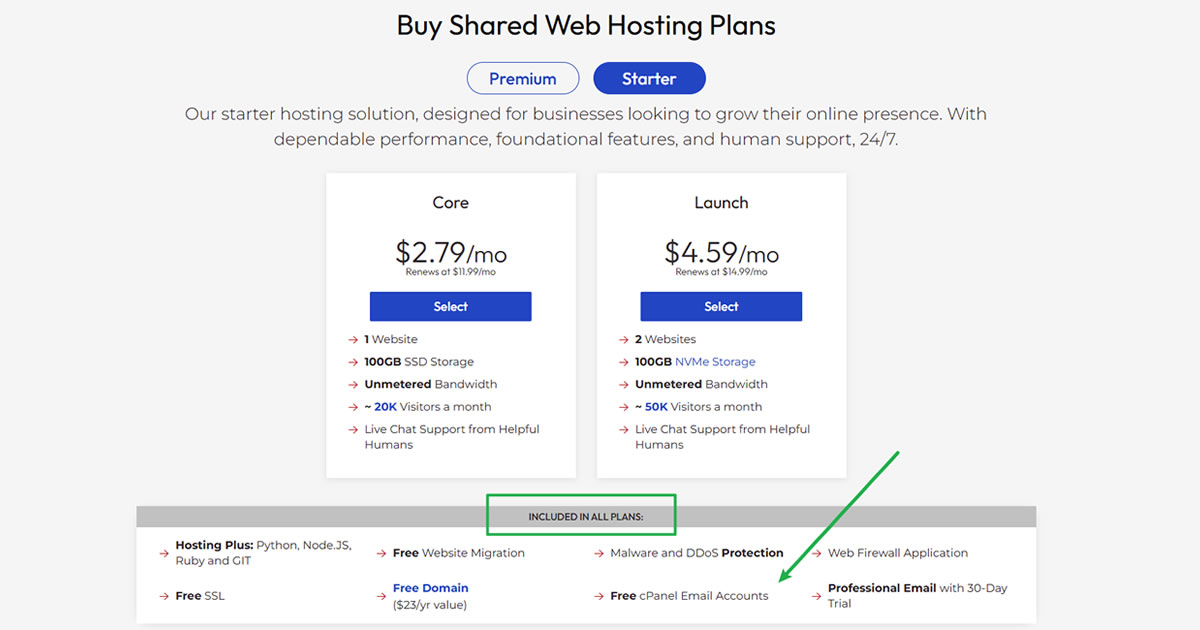
Bundled email hosting refers to the email service that comes with your web hosting plan. It’s the most common setup among small business owners because it centralizes website and email management under a single account.
This approach is affordable and easy to manage, but storage and bandwidth are shared between your website and inboxes. That means your available space for emails depends on the overall hosting quota.
| Pros | Cons |
|---|---|
| Easy to set up and manage | Limited mailbox storage and features |
| Low-cost entry | Not suitable for growing teams or high-volume senders |
| Host multiple small email accounts under one plan | |
| Send high-volume emails |
2. Dedicated Email Hosting

Dedicated email hosting is designed for businesses that need more inbox capacity or advanced email functions. Unlike bundled hosting, it runs independently from your website and allocates separate storage, bandwidth, and resources purely for email use.
Many dedicated hosts also filter spam, synchronize with mobile devices, and include collaboration tools. The main drawback is the extra cost, but you gain improved reliability and control.
| Pros | Cons |
|---|---|
| Easy setup with intuitive dashboards | Higher cost than bundled plans |
| Advanced features like sync and anti-spam filters | Separate account to manage |
| Independent performance from web hosting | |
| Send high-volume emails |
3. Enterprise Email Solutions (SaaS)

Enterprise email services like Google Workspace and Microsoft 365 Business host your emails in the cloud under a Software as a Service (SaaS) model. These platforms support your custom domain but are managed entirely through the provider’s cloud infrastructure.
They’re ideal for teams needing enterprise-level security, productivity tools, and scalability. However, since each user is billed individually, costs can add up quickly as your team expands.
| Pros | Cons |
|---|---|
| Simple setup and reliable uptime | Extra administrative work |
| Powerful collaboration and integration tools | Cost increases with additional users |
| Enterprise-grade security and support |
How to Choose the Right Email Hosting Option?
Selecting the right email hosting provider means evaluating several key factors that affect the security, reliability, and accessibility of your business communications. Among them, reliability and flexibility should always top your list.
Free Web Hosting Consultation
Need hosting advice that’s actually tailored to your needs? At HostScore.net, we’re here to help. Get a free chat with our team — we’ll match you with the best hosting options based on your goals, traffic, and growth plans.

Security
Your clients trust you with sensitive information: names, emails, invoices, sometimes even payment details. That’s why your chosen provider must secure, filter, and protect every message that passes through its servers.
Essential security features include:
- Data Encryption – Ensures messages are transmitted securely and protected from interception.
- Anti-Malware Protection – Blocks malicious attachments and links.
- Spam Filtering – Reduces phishing attempts and unwanted clutter.
- Two-Factor Authentication (2FA) – Adds a second layer of protection against unauthorized access.
Accessibility
Modern teams send and read emails across multiple devices, including browsers, mobile apps, and desktop clients. Your email hosting provider should support all major access protocols (Webmail, IMAP, and POP) to ensure seamless access wherever you work.
- Webmail – Lets you log in directly through your browser without installing software.
- IMAP – Synchronizes your inbox across devices, so everything stays consistent.
- POP – Downloads emails to a single device for offline storage and backup.
Uptime and Reliability
Even short downtime can interrupt workflows and harm your reputation. Look for hosts that guarantee at least 99.9% uptime and have a track record of stable delivery performance. Reliable uptime ensures your business never misses critical client communications.
Blacklist-Free Assurance
A blacklisted IP can stop your emails from reaching clients altogether. Choose providers that maintain clean IP pools and monitor reputation continuously.
If you’re unsure, you can check a host’s IP status with MX Toolbox before signing up.
Integration and Add-Ons
Email works best when it connects seamlessly with your other business tools. Opt for providers that integrate calendars, storage, or CRM systems into your workflow.
- Google Workspace – Integrates Gmail with Calendar and Docs.
- Microsoft 365 – Combines Outlook with Teams, SharePoint, and OneDrive.
These integrations help streamline collaboration and reduce time switching between apps.
FAQs on Email Hosting
What does email hosting do?
Email hosting is a service that stores, sends, and receives messages on servers linked to your own domain. Instead of relying on Gmail or Yahoo, your emails are routed through a dedicated mail server that handles delivery, filtering, and authentication for addresses like [email protected].
Do I need web hosting to have email hosting?
Not necessarily. Many users buy standalone email hosting plans that run independently from their websites. However, if your web host includes free email accounts (like Hostinger or InMotion), you can manage both website and mail from a single dashboard.
Is business email hosting worth paying for?
Yes. Paid email hosting improves deliverability, data security, and brand professionalism compared to free email accounts. Most providers also filter spam, encrypt connections, and support custom authentication (SPF, DKIM, DMARC). These features are rarely offered by free email providers.
How much should email hosting cost?
Email hosting usually costs between $0.39 and $3 per month per mailbox for small-business plans. Premium or enterprise solutions such as Google Workspace or Microsoft 365 typically range from $5 to $12 per user per month, depending on storage, support, and collaboration tools.
What is the best email hosting service for small businesses?
The best option depends on your needs and budget. Hostinger and InMotion Hosting are ideal if you want affordable plans with free email included. Google Workspace or Microsoft 365 fit teams that need productivity suites and integrated calendars. For detailed comparisons, visit our Best Email Hosting Providers guide.
How can I have my own custom email address?
To have your own custom email address, you’ll need to:
1. Register a domain name (e.g., yourcompany.com).
2. Choose an email hosting provider or plan that supports your domain.
3. Create email accounts in the hosting dashboard.
4. Update DNS MX records to point to your mail server.
5. Access emails through Webmail, IMAP, or POP using your preferred client.
Most providers, such as Hostinger or InMotion, include wizards that automate these setup steps.
Can I migrate my emails from Gmail or Outlook to a new host?
Yes. Most email hosting providers support IMAP migration tools that transfer your messages, contacts, and folders. The process is typically automated — you just provide login credentials for both old and new accounts.
Does Microsoft offer email hosting?
Yes. Microsoft 365 Business includes professional email hosting powered by Exchange Online. It supports custom domains, large mailboxes, shared calendars, and integration with Outlook, Teams, and OneDrive.
What happens if my email host goes down?
A reliable host guarantees 99.9% uptime and usually maintains redundant mail servers to minimize disruptions. For critical operations, you can set up email failover or backups to prevent lost messages during downtime.
Can I send marketing or bulk emails using regular email hosting?
Most standard email hosts limit outbound volume to prevent spam abuse. If you need to send newsletters or campaigns, consider a dedicated email marketing platform (such as Brevo or Mailchimp) integrated with your domain for proper authentication and tracking.
Is it possible to self-host emails?
Yes, but it requires technical management. You’ll need to set up and maintain your own mail server, configure DNS records (MX, SPF, DKIM, DMARC), handle security patches, and monitor IP reputation to avoid blacklisting. Self-hosting offers full control but demands time and server expertise. Most businesses find managed email hosting far easier and more reliable.
Final Thoughts
Choosing the right email hosting solution ensures reliability, security, and professionalism every time you hit send.
For most small businesses, bundled email hosting (included with web hosting plans) is a simple and affordable start. As your team grows, dedicated email hosting or cloud-based suites like Google Workspace or Microsoft 365 provide better scalability and integration with everyday tools.
Whichever route you take, remember to prioritize security, uptime, and clean sender reputation. These factors affect not just your inbox, but how your business is perceived by clients and partners.
If you’re ready to explore your options, check out our comparison of the Best Email Hosting Providers. You can also use our Hosting Cost Calculator or get a Free Consultation to find a setup that fits your goals.